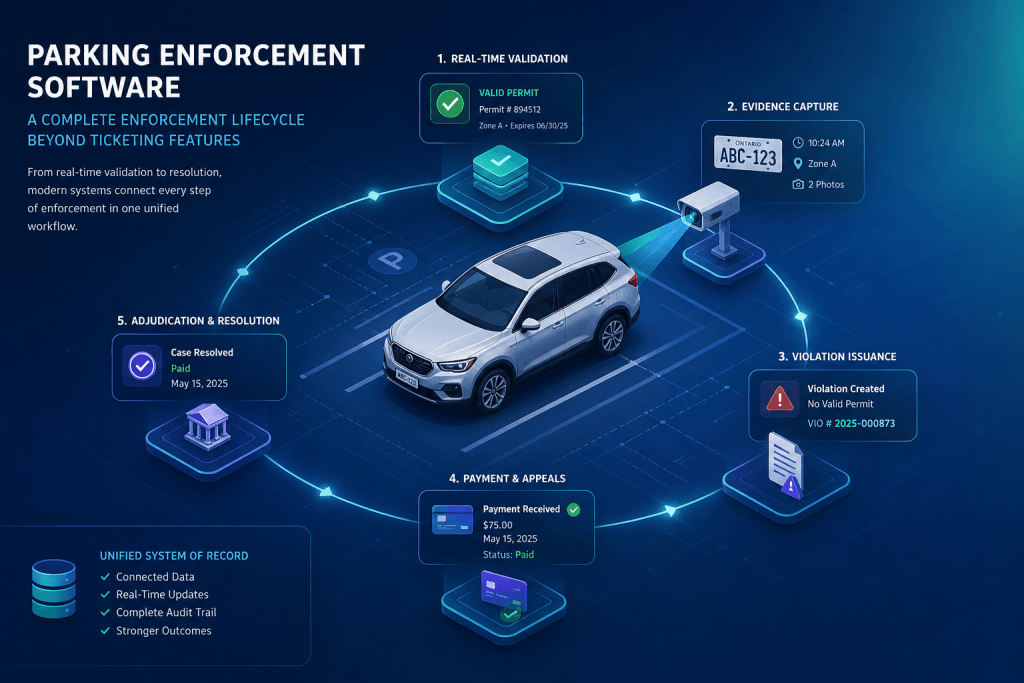
Parking Enforcement Workflow: How Modern Enforcement Operates

The enforcement workflow is the connective tissue of a parking operation. It’s not any single tool or feature — it’s the sequence of steps that transforms a patrol observation into a resolved case, and the data architecture that makes each step inform the next.
When the workflow is well-designed and operating within a connected system, enforcement is predictable. Officers know what to do. Administrators see what’s happening in real time. Parkers have a clear, consistent experience whether they’re paying a citation or disputing one. And management has the data to understand whether the operation is actually working.
When the workflow is fragmented — steps handled by different systems, data transferred manually between them, decisions made without full context — the problems are everywhere. Tickets issued on stale permit data. Evidence assembled from three different places when a dispute is filed. Administrative staff spending their time on data reconciliation instead of case management.
This post walks through the modern parking enforcement workflow in detail — what each stage involves, what it looks like in a connected system, and where fragmented operations tend to break down.
Stage 1: Patrol planning
Effective enforcement starts before officers leave the building. Patrol planning determines which zones get covered, when, and at what intensity — and in a connected system, those decisions are data-informed rather than based purely on habit or intuition.
The data that informs patrol planning includes historical violation rates by zone and time window, compliance trends over recent patrols, repeat offender activity by area, permit utilization by lot, and any special events or permit activations that affect expected occupancy. An operation that reviews this data before scheduling patrol coverage is deploying its enforcement resources against known patterns rather than covering the same zones the same way every shift regardless of what the data says.
For most operations, this level of data-informed planning becomes available only when enforcement, permit, and payment data all live in the same system. When those data sets are separated, the analysis that would drive smarter patrol planning requires manual export and reconciliation that rarely happens in practice. The Parking Data and Analytics Knowledge Center covers the reporting and analytics infrastructure this depends on.
Stage 2: Field validation
Vehicle validation is the most operationally critical step in the field workflow — and the one most disrupted by disconnected systems.
In a connected enforcement environment, validation happens in real time. The officer’s handheld or vehicle-mounted LPR camera reads a plate and queries live permit data instantly. The result reflects the current state of that vehicle’s parking permissions — including permits purchased minutes ago, permits that expired since the previous patrol, and watchlist flags that were added since the officer began their shift.
For time-limited zones, validation also checks the digital chalking record — whether this plate was observed in this zone earlier in the shift, how long ago, and whether the dwell time has exceeded the zone’s limit. This check happens automatically, without the officer needing to consult a separate system or recall a previous observation manually.
The practical alternative — loading permit data onto handheld devices at the start of each shift — creates a window of inaccuracy that grows through the day. Every permit purchased after the morning export is invisible to field enforcement. In high-turnover environments like university visitor lots or municipal downtown zones, that window represents a meaningful percentage of compliant vehicles that appear non-compliant to the officer’s device.
Stage 3: Violation detection and rule application
When a vehicle fails validation, the system determines the applicable violation. For permit violations, this is direct: the vehicle has no valid permit for this zone. For time-based violations, it’s the calculated dwell time exceeding the zone limit. For watchlist violations, it’s the plate matching a flagged record — a scofflaw hold, a security alert, or a repeat offender threshold.
The system applies these rules consistently. The same vehicle, in the same situation, gets the same determination regardless of which officer is running the patrol. This consistency is one of the most practically important outputs of automated enforcement — not because officers are unreliable, but because consistent rule application eliminates the “I didn’t know the rule applied here” class of disputes before they’re filed.
It also matters for operations that run across multiple zones, multiple campuses, or multiple officer teams. When enforcement rules are configured in the system rather than communicated through training and policy documents, there’s no gap between what the policy says and what happens in the field.
Stage 4: Citation issuance and evidence capture
When a violation is confirmed, the officer issues a citation. In ViolationAdmin, issuance from a handheld device captures the plate, vehicle make and colour, violation type, zone, timestamp, GPS location, officer identity, and photographs — all in a single workflow. For operations using Bluetooth-enabled printers, a physical notice is produced on the spot. For paperless workflows, the citation is delivered electronically.
The citation appears in the back-office system the moment it’s issued. Not at end of shift. Not after a sync. Immediately.
That immediacy has practical consequences. Administrators monitoring an active enforcement patrol can see citations as they’re issued. The payment portal reflects new citations in real time — parkers who go looking for their ticket can find it and pay it before they’ve left the area. And the full evidence package is attached to the citation record at the moment of issuance, not assembled afterward when memories have faded and photos might have been lost.
Stage 5: Back-office processing
Once a citation enters the system, the back-office workflow begins automatically. The parker receives a notification with their citation details and a link to the online payment and appeals portal. Administrators see the new case in their queue with the complete evidence record immediately accessible.
For the majority of citations, this stage is brief. The parker reviews the citation, decides it’s valid, and pays online. The case closes. No administrative involvement required beyond the system generating the receipt and updating the records.
For appeals, the workflow is more involved — but not more complicated when evidence is complete. The parker submits a dispute through the online portal, providing their explanation. The administrator opens the citation record and sees everything: the plate read, vehicle photos, GPS location, timestamp, the permit status of that vehicle at the exact moment of the violation, and the chalking record if applicable. The information needed to make a fair, defensible decision is in one place.
Columbus College of Art and Design specifically noted the improvement in their appeals process after implementing OPSCOM — the ability to quickly access complete evidence records and follow up with parkers directly made dispute resolution faster and more consistent for both sides. Read the CCAD case study.
Stage 6: Escalation and case closure
Violations that go unpaid enter escalation workflows. In a connected system, these workflows are automated and configurable — late fees trigger on schedule, reminder notifications go out at defined intervals, and cases that reach the escalation threshold move into the appropriate resolution path without requiring manual intervention at each step.
For university operations, escalation typically means integration with Student Information Systems. Unpaid violations automatically generate financial holds on student accounts through Banner, PeopleSoft, or equivalent integrations — ensuring that the enforcement system and the university’s financial system are always in sync without manual reconciliation. See how higher education operations manage this on OPSCOM.
For Ontario municipalities operating under the Provincial Offences Act, escalation means automated Notice of Impending Conviction generation, MTO plate denial workflow triggers, and court-ready documentation produced within the same system that handled the original citation. See how municipal enforcement handles POA workflows on OPSCOM.
For property management and mixed-use developments, escalation means structured consequence progression — warning, fine, financial hold, towing authorization — tracked by the system and applied consistently based on each vehicle’s violation history. The Village at Valley Forge runs their three-strike towing policy entirely within OPSCOM’s escalation workflow.
What breaks when the workflow is fragmented
It’s worth being specific about the failure modes that connected workflows prevent, because they’re easy to normalize when you’ve been operating in a fragmented environment long enough that the workarounds feel like standard procedure.
Stale permit data in the field means tickets issued on valid permits that the handheld device didn’t know about. Each one generates a dispute. Each dispute takes administrator time to resolve. Over a week of enforcement, this is a significant source of avoidable work.
End-of-shift data entry means citations issued in the field don’t appear in the payment system until someone sits down and enters them — usually hours after issuance. Parkers who look up their ticket and find nothing assume they don’t need to pay. Collection rates drop.
Evidence stored separately from citation records means that when a dispute is filed, someone has to retrieve photos from a shared drive, cross-reference them with the citation in a different system, and manually reconstruct the evidence package. This takes time, requires multiple systems to cooperate, and introduces opportunities for evidence to be missing or mismatched.
Manual escalation tracking means cases that should have generated late fees, reminder notices, or financial holds stay open longer than they should because nobody noticed the deadline. Revenue leaks in ways that are hard to measure and easy to overlook.
Brandon University’s situation before OPSCOM illustrates this clearly. Violations were managed in spreadsheets. Repeat offenders were untracked. Revenue had dropped year-over-year and the operation had no way to understand why. The Brandon University case study shows what a connected system revealed and what changed as a result.
Explore the enforcement system in depth
- How automated parking enforcement works as a connected system
- The parking citation lifecycle: from issuance to resolution
- How compliance automation drives consistent enforcement decisions
- Officer tools that enable real-time validation and enforcement
- ViolationAdmin: OPSCOM’s parking enforcement platform
- Parking Enforcement Systems Knowledge Center